 Langless
Speak and listen in any language. No human interpreter.
Live voice translation across dozens of languages — in Zoom, Teams or Meet, in multilingual chat rooms, or listening to YouTube, TV and podcasts.
✓ 14-day guarantee · ✓ Cancel anytime · ✓ Secure payment via Paddle
See it in action
Live voice translation, in seconds.
⚡ Real time · dozens of languages · no human interpreter
Why use AI voice translation
For professionals and teams that need to communicate across languages at work, in meetings, or day-to-day — no human interpreter needed.
No human interpreter
Talk in another language instantly, without hiring a human interpreter.
Real time
Live voice translation across dozens of languages, as you speak.
Chat rooms
Create rooms and talk with people worldwide — each in their own language.
Listen to any audio
Translate YouTube videos, TV, podcasts and webinars in real time. No installation. Just open and listen.
Privacy & control
Your voice is translated by the AI provider on your own account (your own key) — we never store your audio, and you pay only for what you use, no markup.
Human interpreter or Langless?
When each one is worth it.
Human interpreter
Charged by the hour or day, and must be scheduled. Usually one language pair per professional. Best for high-stakes legal or diplomatic settings.
Langless
Instant and 24/7, across dozens of languages, both ways. Plans from US<5/mo, plus the AI minutes (from ~US$0.03/min, with your own key — no markup). Ideal for meetings, sales, support and everyday use.
Set up in minutes
In Meeting mode, a virtual audio cable connects Langless to Zoom, Teams or Meet — and the app walks you through every step.
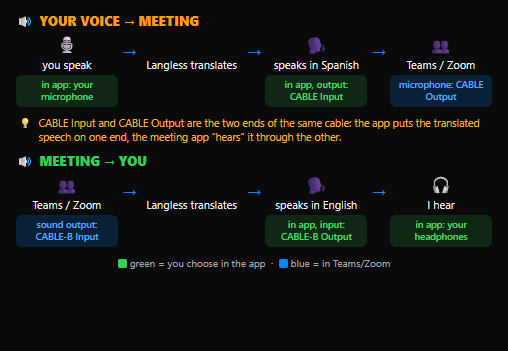
How you use it
Start free. Trial and plans unlock more.
Free (guest)
Room guest — join and talk, no account, no payment.
Free trial
Listen — activate with your email, no card needed. (1-day access.)
Paid plans
Meeting + everything — professional use.
Plans
Free and Trial above. Plans unlock Meetings and team use.
Licensed by team, not by person
Seats are shared across your whole team. Since everyone rarely translates at the same time, you need far fewer seats than people — you pay for simultaneous use, not per head.
Plans don't include the AI provider — you use your own key and pay per minute directly to your provider, with no markup.
✨ Focus on the result: once set up, just speak — the translation happens on its own.
Frequently asked questions about real-time translation
How does the translation work?
You just speak, and Langless translates your voice live, in real time, into the language you choose — no human interpreter. Your AI provider's intelligence does the translation in seconds.
Do I need an AI provider account?
It depends. To HOST a room or use the Listen or Meeting modes: yes — you plug in your own AI provider key (BYOK) and pay only for the minutes used, directly to the provider, with no markup. To JOIN someone else's room as a guest: no account or key needed — just open the link.
Do I need to install anything?
Only for Meeting mode (Zoom, Teams, Meet): a virtual audio cable (driver) that connects Langless to your meeting app — the app guides you step by step. For listening and chat rooms, nothing to install.
Is my voice recorded?
On our server, nothing is recorded or stored — audio only passes through in real time to be translated. There's an optional local recording that stays on your device (you download or delete it). Translation is done by your AI provider with your own key, so data handling follows your account and provider's policy. Your key stays in your browser.
Which apps does it work with?
Zoom, Microsoft Teams, Google Meet, WhatsApp and any desktop call app, using the virtual cable. Chat rooms work right in your browser.
Can I cancel? Is there a guarantee?
Yes. Cancel anytime, with a 14-day money-back guarantee. Refunds are handled directly by Paddle, via the link in your receipt — no need to email us.
How do I translate a Zoom meeting in real time?
Open Langless in Meeting mode, install the virtual audio cable (the app walks you through it step by step) and pick your languages. From then on your speech is translated live inside Zoom, Teams or Meet — no human interpreter.
Does Langless replace a human interpreter?
For business meetings, conversations and everyday support, yes: Langless translates your voice live at a fraction of the cost of a human interpreter and is available around the clock. For high-stakes legal or diplomatic settings, a professional interpreter is still recommended.
Which and how many languages does Langless translate?
Dozens of languages, including English, Portuguese, Spanish, Chinese, French, German and many more. You pick your language and the other person's, and translation happens both ways in real time.
Can I try it free before subscribing?
Yes. Joining a room as a guest is free, and Listen mode has a free trial you activate with just your email, no card. You only subscribe when you need Meeting mode or team use.
Join the waitlist
We'll let you know when the app opens. No spam — just the launch and updates.